How to find the best drug plan or Medicare Advantage plan for your needs?
You can determine the best plan for you by using the Medicare.gov Plan Finder tool. With it you can determine the coverage and costs for stand-alone prescription drug plans and Medicare Advantage plans with prescription drug coverage based on your specific needs. You enter the prescription drugs and pharmacies you use in the Medicare Plan Finder tool. Based on that information, it shows the available coverage and computes your total cost for the year for each plan, including premiums, deductibles and co-pays for your drugs, and lists them in order of lowest cost.
Medicare’s Plan Finder can compute drug costs for both Medicare Advantage plans and stand-alone prescription drug plans, individually or together. In addition to the costs, Plan Finder will show you whether a plan has any restrictions on your drugs, the star ratings for each plan, and if there are any preferred pharmacies in a given plan.
Plan Finder will work best if you have a MyMedicare account. Without this account, you will not be able to save a list of drugs, or any of your search criteria. The instructions, below, include information on how to create a MyMedicare account.
HICAP can help you with Plan Finder.
Contact HICAP for help reviewing your current prescription drug needs, either as part of a Medicare Advantage Plan or as a stand-alone Prescription Drug Plan.
A PDF file on this topic can be found below. You may view it or download a printable PDF version of Medicare’s Plan Finder Tool Instructions. (Requires Acrobat Reader)
If you have difficulty accessing, reading, or interpreting this document, please CONTACT US.
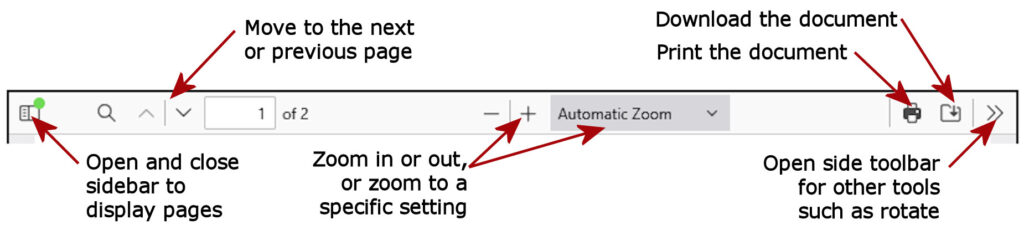
Click the “Show More” button, below, for more information on how to use the PDF toolbar, or how to translate the document to other languages.
To translate the document download the PDF file. Then use a PDF translation app, such as Google Document Translate.
The document, below, has option buttons on the top of the tool bar. The image below shows the function of those buttons. (NOTE: the toolbar may look different in different browsers or phones.)